Script Introduction
Core Scripts Overview
The scripts generated by the software require core scripts to function properly; otherwise, clicking will have no effect. During the creation phase, both the necessary core scripts and the generated scripts from EZMenu must be added to the model for the generated scripts to work correctly. After completing the setup and configuring the signature, you need to regenerate the scripts with the signature and replace the [EZMenu]Setup script with the [EZMenu]Master script before distributing your product. For more information on how to distribute your product, refer to here.
Core Script Files
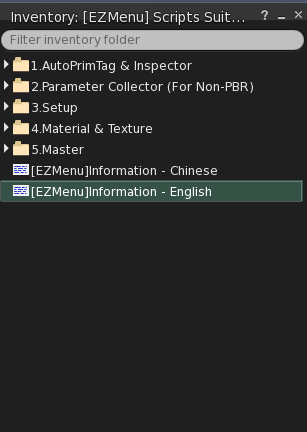
After obtaining the core scripts, you will receive the following script directories:
- 1.AutoPrimTag & Inspector:
- AutoPrimTag & Inspector - These scripts are used to add PrimTags to the model. For each Prim in the model, a PrimTag is added, which serves as a unique identifier for EZMenu to recognize each Prim. This script quickly generates PrimTags for each Prim and automatically adds them to the model’s description field.
- Material Inspector - This script allows you to view the material information of a specific Face in your model. Clicking the model will output the material information of the clicked Face, including the Face number and material UUID, in the
Nearby Chat.
- 2.Parameter Collector (For Non-PBR) - These scripts are used to collect texture parameters for non-PBR textures. They collect the current texture settings of the model, recording parameters for each Face of each Prim. After collection, the script automatically outputs the collected parameter information to the
Nearby Chat. If a Face has its Diffuse texture set to Default or Blank, the script will skip collecting that Face. Therefore, if you do not need to collect a specific Face, set its Diffuse texture to Default or Blank. For more details on usage, refer to here. - 3.Setup - Core scripts for the creation phase. These scripts are used alongside the generated scripts during the creation phase and are also used to obtain the signature. The signature information changes each time the script is modified, but once generated, it remains valid as long as the correct signature is used.
- 4.Material & Texture - Core scripts for material and texture switching. These scripts must be used alongside the generated scripts and either
[EZMenu]Setupor the signed[EZMenu]Master.- [EZMenu]M&T - Core scripts supporting both PBR and non-PBR textures.
- [EZMenu]M&T - Non-PBR - Core scripts supporting only non-PBR textures.
- 5.Master - Core scripts for product distribution. This version requires signature information to function correctly. The signature information changes each time the script is modified, but once generated, it remains valid as long as the correct and complete signature information is used.
How to Get It
Available for purchase on the Second Life Marketplace, Buy Now.